
Showing posts with label Review. Show all posts

Wednesday, November 23, 2022

Blocks Rock! - A review


I was contacted by Katie from Blocks Rock! about looking at this game and sharing what I think about it. I am not being paid to write this review. Blocks Rock! is a STEM toy and educational game. 
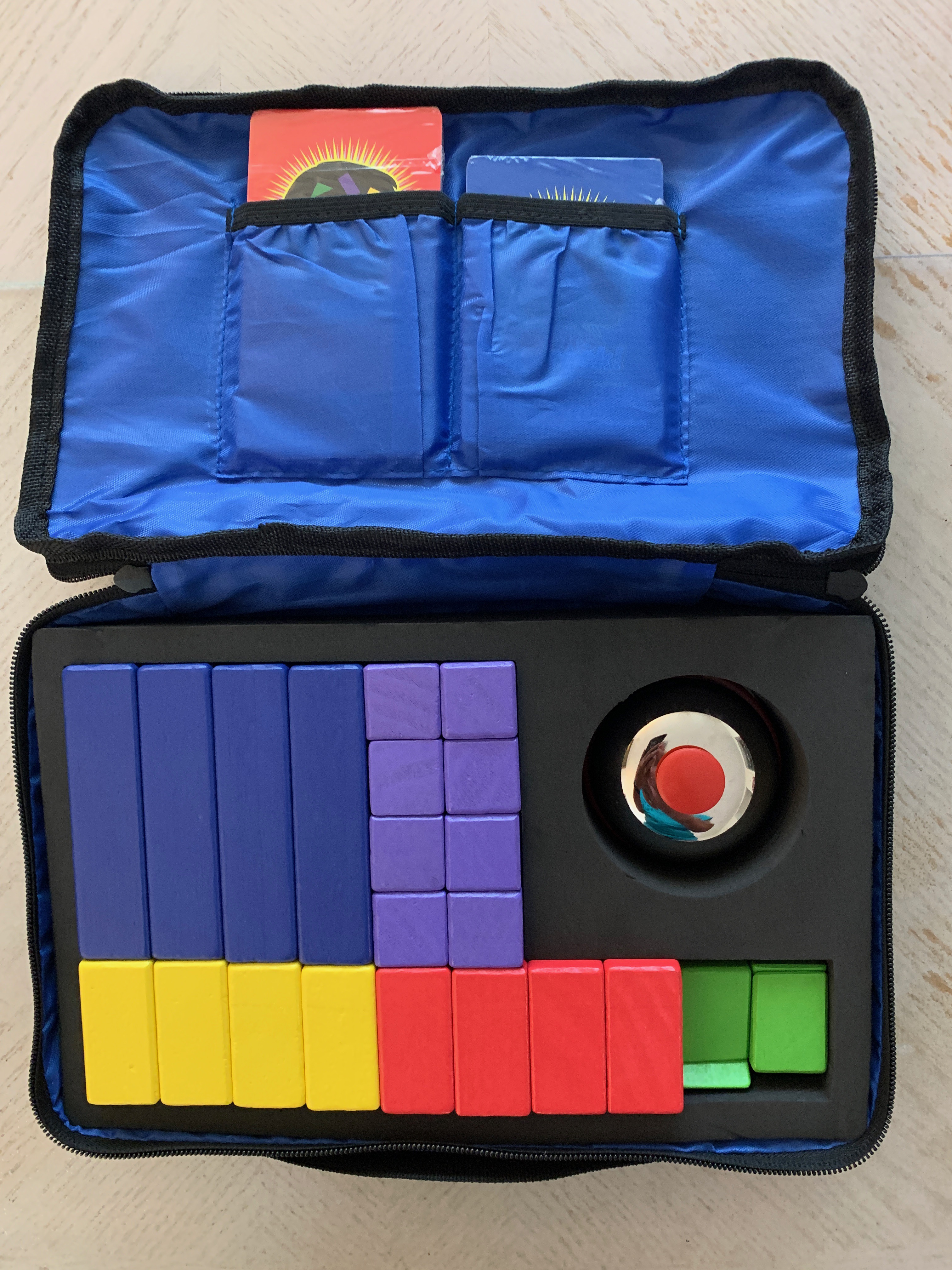
Blocks Rock! Is a game for children 4 years and up. It comes in a carrying case that includes 24 wooden blocks, 2 decks of cards, and a bell. Today (Wednesday, November 23, 2022), they are offering a $20 discount on this game.

When I opened the game, I was impressed with all of the different shapes and colors the wooden blocks come in which I think would appeal to kids of all ages. There were two packs of cards - one for beginners and one for intermediates along with a separate package for preschoolers. I also like to have students handle concrete material when learning a lesson because I think it helps them retain learning this way.

The preschoolers can look at the cards and place the blocks on the cards to match the design. This would be a great way for children to learn colors, shapes, and matching.

The beginner cards have designs that are flat or need to be built up. I like this extra dimension added to it. Depending on the learner, the teacher could just start with the flat designs, then only the building designs, and then mix them up. In this game, the blocks are divided equally between two players. A card is turned over and each player uses their blocks to copy the design on the card. The first player to complete the design will ring the bell. If it isn’t correct, the players continue and ring the bell when they think they have it completed. The one who completes it correctly first gets to keep the card. The one with the most cards wins.

I think this would appeal to students of all ages just because it is fun! I believe any game that exercises your brain is good for you! Older students would be challenged by the time factor more than the colors and shapes. It would also be great to use with students with special needs who have learning difficulties. This would be a concrete learning tool for students to learn colors and shapes, match designs, and improve spatial skills.

I would highly recommend this game for children. It is durable and easy to store. It would be great in an elementary school classroom or even the school library. Parents who homeschool their children would also find this a great learning tool!

If you use this in your classroom, please let me know what you think!

Original photos by Pat Hensley

Thursday, December 30, 2021

2021 End of Year Review

Last year I did this review and I thought it was a good way to review the year so I will do it again this year. 

Describe 2021 in one sentence. 

2021 seemed like a very long year with lots of ups and downs. 


  1. What’s one way your life has changed for the better? I learned to slow down and enjoy life more. 

  2. What is the biggest challenge you faced? Teaching my first online class. 

  3. What would you go back and change (under your control) and why? Decluttered more. I seemed to have accumulated more. 

  4. What major life lesson did you learn? People don’t want to really know what I think unless I am agreeing with what they think. 

  5. List your Aha moments. Teaching an online class is fun. 

  6. Did you achieve your goals this year? Most of them but I could have done better.

  7. If so, how? Reviewing my goals on a monthly basis is most effective for me.

  8. If not, why? I didn’t seem to have the willpower to eat less. 

  9. Set just one primary goal for 2022 using S.M.A.R.T. (specific, measurable, attainable, relevant, time-sensitive) Lose at least 5 lbs.


How was your year? Please share. 


Tuesday, September 7, 2021

Reading Lists

I have a Goodreads account and I log in the book I’m reading, the date when I’m done, and rate it. I also have a list of books that I want to read in the future. I’ve also connected with others who tend to read the same type of books that I do so when I’m looking for a book to read, I can glance at their lists for suggestions.

In August, I read 9 books. Four of the books were from a murder mystery series by Karin Slaughter. There are ten books in the series and so far I’m really enjoying the ones that I’ve finished. Two of them came as recommendations from friends. Two were sent to me for reviews. One was a nonfiction book that I read in order to reach my goal of reading twelve nonfiction books for the year.

I think keeping reading lists would be good to do with students. Older students could have a Goodreads account and follow each other. Younger students could keep a reading list of their own. They could list the book, the author, and rate it on a scale of 1 to 5. Students can get in groups and share the latest book they read and why they rated it the way they did.

Students who like mysteries can be grouped together. Others who like fantasies can be grouped together. Those that like an assortment of things can be in a separate group. These groups can change as student interests change.

When a student begins a book, the class can be asked to see who else has read it and what they rated it.

Different ratings of books can be discussed as partners. If the rating were different, partners can discuss why they rated it that way. This is a great way to have a critical discussion. The class can have a discussion on what they think makes a book “good” and what makes them rate books in a certain way.

Do you have students keep track of what they have read? Do they rate them and share their ratings? If so, please share.

Photo by Aaron Burden on Unsplash

Thursday, August 19, 2021

Wacom Intuos - Review

I was recently sent a Wacom Intuos Creative Pen Tablet to review and I’m not being paid for this review. I’ve heard about these but I’ve never used one. When I was asked to try it, I was so excited because I wanted to know if it was worth teachers or schools buying one or not. I was sent the Wacom Intuos 6100 with Bluetooth.

One thing I noticed was that there weren't a lot of instructions on how to begin. So I used the directions that were sent to me which were mainly pictures. I attached the tablet to my laptop (MacBook Pro) with the USB cable that came with it. Then I went to the website that was given in order to download the software and drivers needed. Along with the tablet, 3 bonus software packages were included. I was able to download 2 of them but I needed to update my laptop software in order to open the third one. I also watched the tutorials that were given.

I wasn’t exactly sure how to use the pen and tablet without any directions so I opened up the Clip Studio Paint program on my laptop. I opened up a new blank page and used the pen on the tablet, I was surprised to see the writing on the blank page on my laptop. When I hovered the pen on the tablet, I could see the cursor on the screen. I clicked on the calligraphy button on the left and made sure the “ink” was black. Then I started writing and like magic, my writing was there. It was so much fun experimenting on this page with different fonts and styles.

Then I opened up the Clip Studio AfterShot program and played with it also. I was able to adjust and enhance pictures more easily. There were a lot of features that I will need to play with when using the program to understand what they do but using the digital pen was very easy.

I also opened up a Microsoft Word document and was able to handwrite my notes onto the screen. It is so much easier to draw diagrams and examples to show students. It is also easier to write math equations just as if you were writing on a piece of paper.

I tried using it connected to my laptop as well as using Bluetooth and both worked very well. I like the freedom that Bluetooth gives me if I need to walk around a classroom.   

I know why there weren’t a lot of instructions because it is pretty intuitive on how to use the pen. The pen works better than using a mouse or a trackpad! It does take some practice with using the pen and writing legibly but it was a lot of fun. With more practice, I think I will feel more comfortable using it.

I’ve talked with other teachers who say they have used this in their classrooms. Many have old Promethean Boards that no longer get tech support but teachers are able to use their Wacom when teaching the class and using the Promethean Board.

I think this will be a handy tool to have in the classroom as well as a tool to use for personal reasons. I would definitely recommend someone getting this if they feel they don’t have the flexibility with their computers that they would like to have. If they need to draw pictures or diagrams, this would be extremely useful for a teacher. If students are using drawing or editing photos, this would be much easier to use than a mouse or trackpad.

Do you have a Wacom tablet? If so, what do you use it for? Please share.

Original photo by Pat Hensley

Monday, January 11, 2021

2020 by the Numbers

I love numbers and I like to look back at the previous year and see how I can incorporate numbers into a review of the year. I enjoyed doing this and I hope you enjoy seeing it with me. 


0 - cruises

1 - a conference I attended (SCCEC in February, before the pandemic, closed everything down)      

1 - new roof put on the FL house

1 - graduate course taught online

2 -trips to Florida

2 - camping trips

2 - trips canceled (Amtrak to NY, a road trip to MN)

2 - Christmases without my parents

3 - new knitting patterns published

6 - Sweaters knit

7 - pounds lost

10 - months in self-quarantine

26 - Ornaments knitted

39 - squares completed on my National Park Blanket

61 - my age

68 - Husband’s age

78 - Projects knitting/crocheting/spinning

102 - Books read

262 - Blog posts written

267 - days I walked over 10,000 steps

365 - wonderful days spent with my husband

1775 - Miles walked


Photo by Nick Hillier on Unsplash

Tuesday, December 29, 2020

End of Year Review

In End of Year Review by Plant Based Bride, she asks 10 questions. I used her 10 questions to review my year.

Describe 2020 in one sentence. (2020 has been a year of unexpected results.)
  1. What’s one way your life has changed for the better? (I did a lot of things around our house that I’ve been putting off for a long time.)
  2. What is the biggest challenge you faced? (Teaching a graduate course online that involved teachers teaching small children reading, math, and writing.)
  3. What would you go back and change (under your control) and why? (I would have started this plant-based diet earlier in the year.)
  4. What major life lesson did you learn? (I can't trust the media to tell the truth at all.)
  5. List your Aha moments. (Plant-based diets really help me lose weight. I need to eat smaller portions if I want to lose weight. Just exercising won’t help me lose weight.)
  6. Did you achieve your goals this year? (Most of them)
  7. If so, how? (Reviewing my goals on a monthly basis.)
  8. If not, why? (One goal was almost impossible to achieve and I didn’t know it when I set the goal.)
  9. Set just one primary goal for 2020 using S.M.A.R.T. (specific, measurable, attainable, relevant, time sensitive) (Lose at least 5 lbs.)
Photo by Kelly Sikkema on Unsplash

Tuesday, December 31, 2019

Review of 2019


5 Top Achievements
·      Finished writing a book.
·      Held a session at the SCCEC Conference
·      Had a book published.
·      Spent a month in northern Europe
·      Set up an online class for Furman

What I Learned
·      I am capable of writing a book.
·      Europe is a wonderful place to visit.
·      Always leave a few days early for a cruise that starts in another country.
·      Setting up an online course is a lot of work.
·      Being an executor of an estate is the hardest thing I’ve ever done.

What Didn’t Happen?
·      I didn’t lose ten pounds like I had hoped.
·      I didn’t get to go to Minnesota.
·      I didn’t sell a lot of books at my book signing.
·      I didn’t clean my house as well as I should have.
·      I didn’t organize the clutter and take things to storage.

What Would I Change?
·      I would work harder at losing weight. This means controlling what I eat.
·      I would organize the receipts and papers for probate every month instead of waiting 6 months.
·      I would practice my accordion and guitar more.
·      I would clean my house better on a regular schedule.

What Actions Can I Take to Improve?
·      Be committed to losing weight.
·      Stick to my cleaning schedule.
·      Schedule practice time for music.
·      Schedule paperwork organization on my calendar and stick to it.

How Can I Make 2020 Better?
·      Get serious about losing weight.
·      Eat better even when we are on a cruise.
·      Enjoy life to the fullest.

How was your year? How would you answer these questions? Please share.

Photo by NordWood Themes on Unsplash